Release Wave 1 2026: What's New in Customer Insights – Journeys
Quick deep dive into the current release wave in Dynamics 365 Customer Insights - Journeys.

Anticipation has been building over the last few days and I was genuinely curious what Microsoft would include in this release wave. After going through the announcements I have to say I am quite happy with what was published. This wave is not about huge flashy features or entirely new modules. Instead it focuses on improvements that address very real and practical situations teams run into when working with Customer Insights Journeys in day to day projects.
My personal highlight is a feature that pushes Customer Insights Journeys another step forward in bridging the gap between marketing automation and the CRM data model. It allows journeys to interact with Dataverse much more directly than before and removes some of the workarounds we often had to build around the product.
Disclaimer: As with all roadmap announcements, timelines and features may change. Nevertheless it is great to see the direction Microsoft is taking here.
What is coming in this wave
These are my three personal highlights from this release wave:
| # | Feature | Preview | GA |
|---|---|---|---|
| 1 | Transform customer journeys into action with record creation | April 2026 | - |
| 2 | Boost customer confidence with branded content links | September 2026 | December 2026 |
| 3 | Automatically update emails with the latest content | April 2026 | June 2026 |
Feature 1 – Transform customer journeys into action with record creation
This is clearly my favourite feature in this release wave because it allows us as marketers and CRM teams to push the interaction between marketing automation and the CRM data model a bit further.
Until now the actions inside a customer journey were mostly focused on communication. We could send emails, create tasks or phone calls, or rely on predefined behaviour around leads and opportunities. Whenever we needed something more specific the usual workaround involved introducing a Power Automate flow or a custom trigger that would sit next to the journey and handle the CRM interaction.
With this release Microsoft introduces the Create Record tile directly inside the Customer Journey designer. This allows us to create Dataverse records from within the journey itself and gives us full control over how that record should be created. We can decide which table should be used, which fields should be populated, whether values are static or dynamically taken from the customer profile, and at which moment in the journey the record should actually be created. The important part here is that this orchestration now lives directly inside the journey designer instead of relying on additional automation layers.
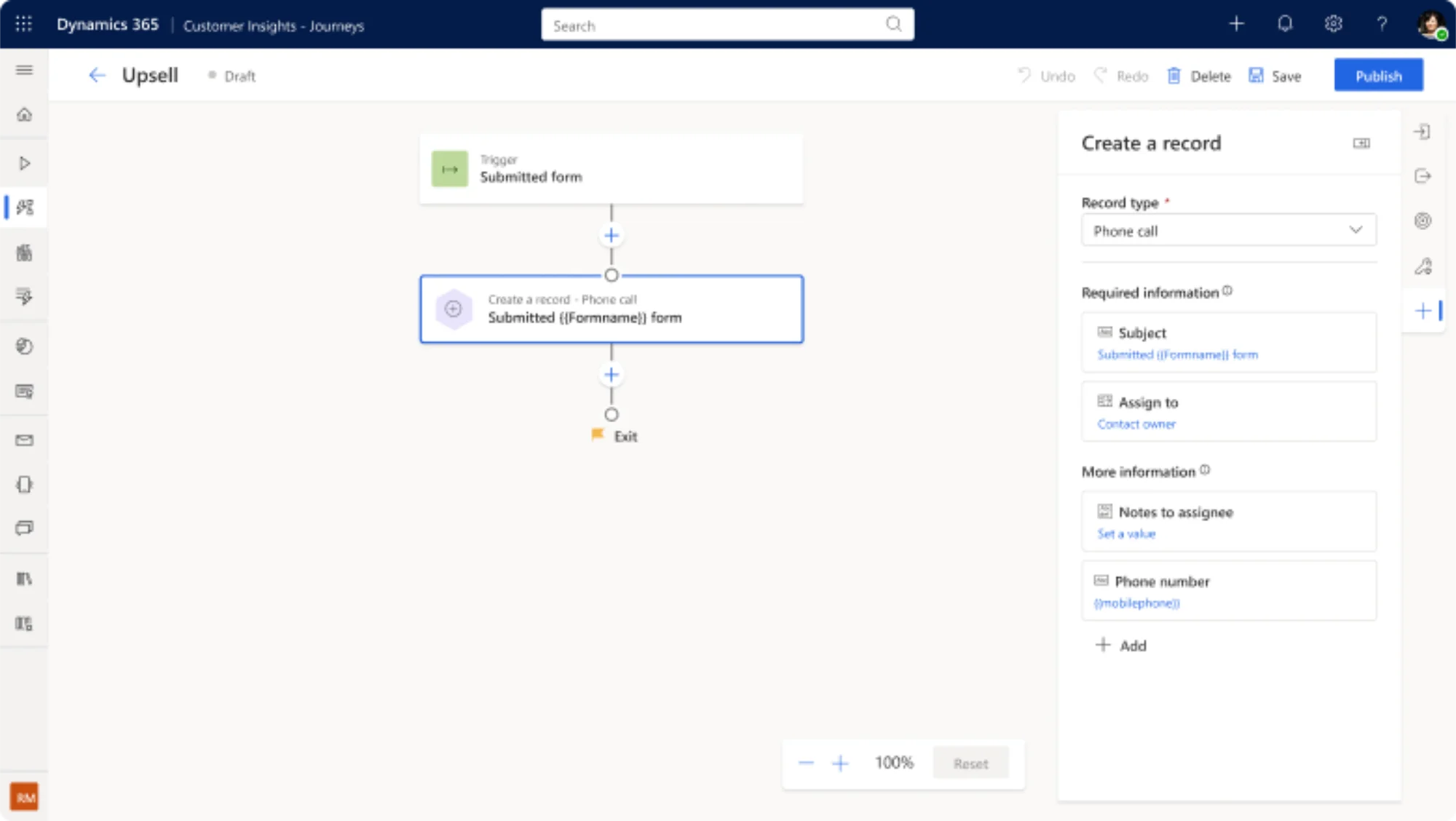
What makes this feature particularly interesting is the flexibility it introduces. Different campaigns have different requirements. Some processes only require minimal information while others depend on specific fields being filled because downstream processes in sales or service rely on them. With the Create Record tile we can now model this logic directly inside the journey instead of building additional technical orchestration around it.
A very practical example for this is event marketing and lead generation. In the past when someone registered for an event we tied to the out of the box event registration behaviour. Instead of relying only on the default event functionality or building workarounds, we can create a lead using the Create Record tile and decide when that lead should actually be created. That could be immediately when the registration is submitted, after the registration is confirmed, or only when the attendee actually checks in at the event.
In practice this makes a big difference because it allows us to create CRM records at the right moment. In many scenarios, I believe this leads to better qualified leads and cleaner data for sales teams. One thing I will definitely keep an eye on is whether Microsoft eventually extends this capability to also update existing records instead of only creating new ones. If that happens the journey designer will be on steroids.
Availability
| Date | |
|---|---|
| Public Preview | April 2026 |
| General Availability | - |
Feature 2 – Boost customer confidence with branded content links
The second highlight is smaller but something many marketing teams have been waiting for for quite a while, and to be honest we have already been there before with this announcement.
Today links generated by Customer Insights Journeys for landing pages, event registrations or preference centres often look something like this:
assets-eur.dynamics.com/...
Technically this works perfectly fine but it does not necessarily reflect the brand sending the communication. With this update organisations will be able to use their own branded domains for these links so that customers interacting with emails or landing pages see a link that belongs to the brand they are engaging with rather than a generic Microsoft domain.
From a marketing perspective this matters more than it might initially seem. The overall experience of interacting with a brand does not stop at the email or landing page itself. It also includes the small details such as the URLs customers see when hovering over a link or when a browser opens. Especially in Germany people are very sensitive when it comes to unfamiliar domains in emails, so having branded links that clearly belong to the organisation helps strengthen trust and recognition throughout the entire interaction.
Assuming the feature arrives as announced, this will be something we enable by default for all customers simply to ensure a consistent and trustworthy brand experience.
Availability
| Date | |
|---|---|
| Public Preview | September 2026 |
| General Availability | December 2026 |
Feature 3 – Automatically update emails with the latest content
The third feature addresses a very common operational challenge in email marketing. Today content blocks inside Customer Insights Journeys behave as static elements, which means that if a block is reused across multiple emails and later needs to change each email has to be opened and updated individually.
With dynamic content blocks we can centrally manage reusable elements such as headers, footers, banners or promotional sections and have those updates automatically reflected across all emails where the block is used. Some teams already tried to solve parts of this problem with dynamic content fields, for example updating the copyright year in a footer, but this new capability goes a step further.
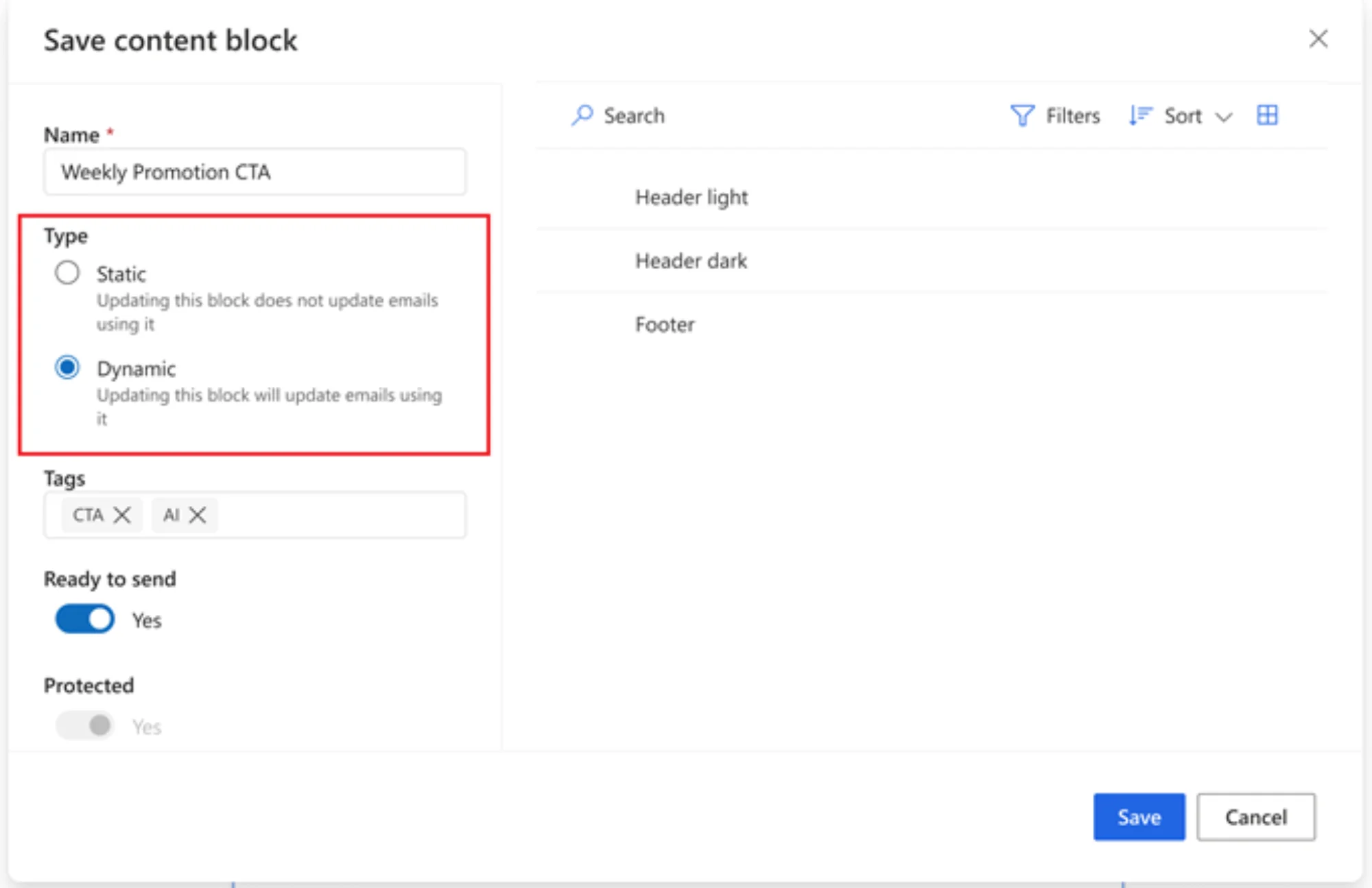
It becomes much easier to handle scenarios such as rebranding, updating event banners across campaigns, or maintaining promotional content blocks that are reused in many emails. Instead of touching every single email we can update the content once and have it propagate everywhere the block is used. For teams running larger campaign portfolios or regularly promoting events this will simply make day to day content management much easier.
Availability
| Date | |
|---|---|
| Public Preview | April 2026 |
| General Availability | June 2026 |
My take
At first I was actually a bit surprised that this release wave only includes five features. But after thinking about it for a moment it quickly became clear that there is quite a lot of potential hidden in some of them. The record creation capability alone opens many new possibilities for how we design customer journeys and connect them more directly with CRM processes. The dynamic content blocks are another example where the value might only become obvious once teams start using it in real projects.
I am very curious to see what customers think about these changes and what we as a community come up with in terms of new use cases and implementation patterns once the features move from preview into real implementations.